How to Use Video in Your
GoHighLevel Welcome Snapshot
What is a GoHighLevel Welcome Snapshot?
A GoHighLevel Welcome Snapshot is a pre-configured account blueprint that includes customized dashboards, automated workflows, and embedded video tutorials designed to guide new white-label software users through their initial setup. It eliminates confusion by immediately presenting visual instructions the moment a user logs into their CRM.
The first 60 seconds after a client logs into your white-label software will dictate whether they become a highly engaged, long-term user or an immediate churn statistic.
Most agencies make a critical onboarding error: they load a generic Snapshot that dumps the new user onto a completely blank metrics dashboard. A local business owner logging in for the first time does not care about empty pipeline charts; they care about what they are supposed to do next. By embedding structured video assets directly into your Welcome Snapshot and initial workflows, you take control of the user's focus and visually guide them to their first "quick win."
Customizing the GoHighLevel Dashboard with Video
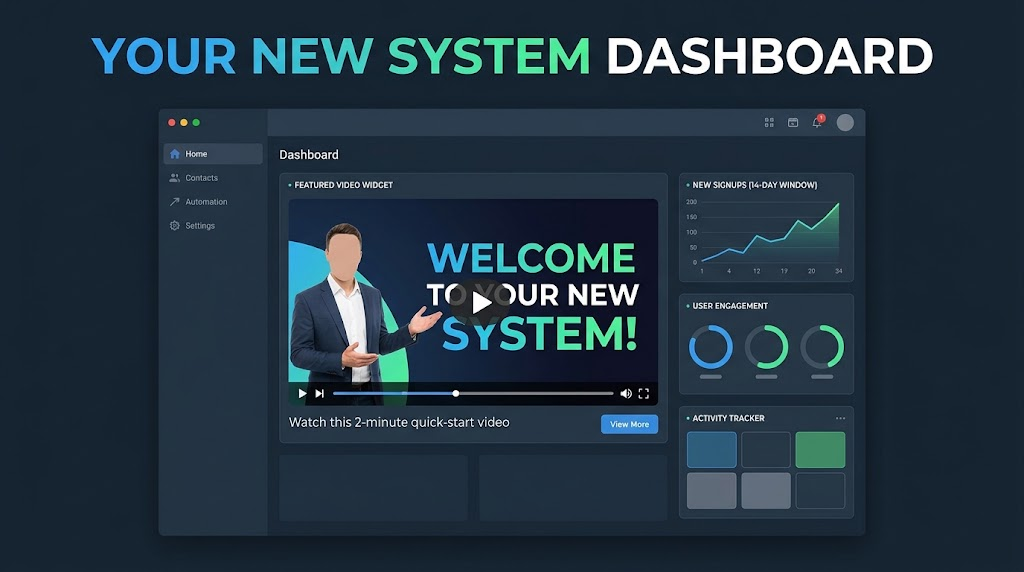
GoHighLevel’s Custom Dashboards feature is one of the most powerful, yet underutilized, tools for SaaS retention. Instead of forcing new users to stare at zeroed-out analytics, you can modify the default dashboard layout to feature a prominent, embedded welcome video front and center.
When a client logs in and is immediately greeted by a high-production video explaining exactly how to navigate their new system, it changes the entire psychological dynamic of the software. It removes the intimidation factor of learning a new CRM, instantly builds brand authority, and establishes profound trust. You are no longer just selling software; you are providing a guided, premium tech experience.
The "Day One" Video Automation Workflow
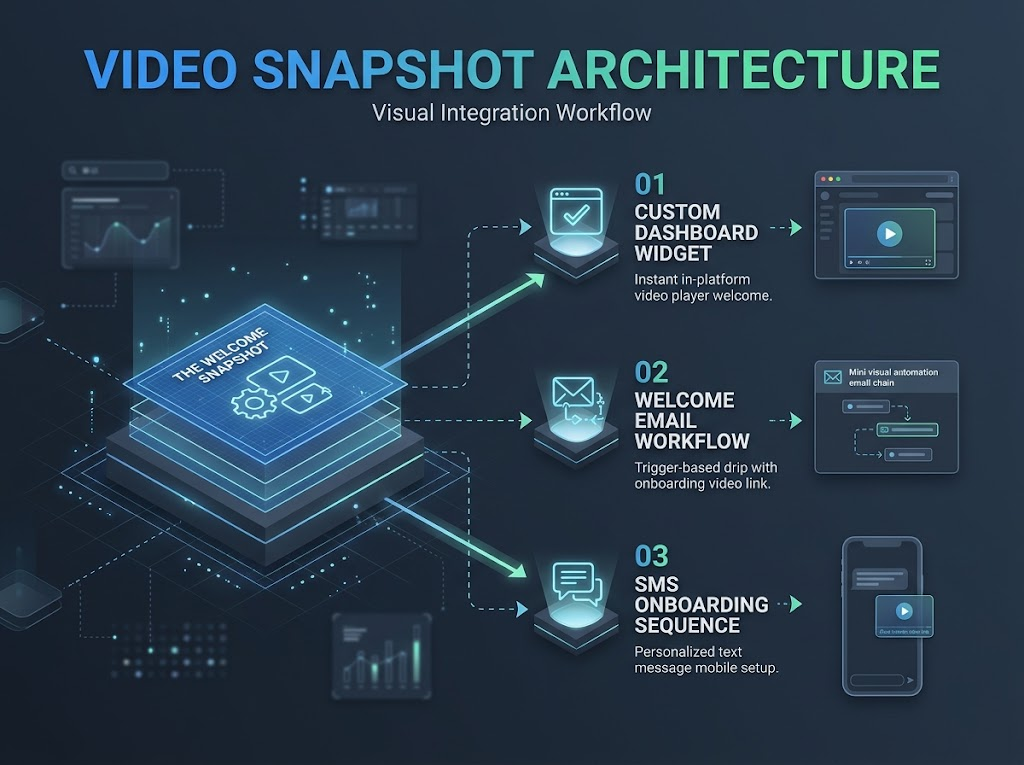
Dashboard videos are highly effective, but they should be paired with proactive, trigger-based communication loaded directly within your Snapshot. Your Welcome Snapshot should include a pre-built "Day One" automation workflow.
The ideal Day One trigger operates like this: As soon as the GoHighLevel sub-account is provisioned, the system automatically fires off a welcome email and SMS. Instead of long, text-heavy instructions, these messages contain links to brief, personalized video tutorials. These videos should cover the absolute bare minimum required to get started—such as downloading the LeadConnector mobile app and sending their first test message.
Text-Based Onboarding vs. Video-Integrated Snapshots
| Metric | Standard Text Snapshots | Video-Integrated Snapshots |
|---|---|---|
| Time to First Action | Slow; users get bogged down reading manuals. | Rapid; users mirror the visual instructions immediately. |
| Support Ticket Volume | High; users constantly ask "where is this button?" | Low; visual guidance answers UI questions automatically. |
| Information Retention | Poor; users skim and miss critical setup steps. | High; visual and auditory cues reinforce learning. |
| Brand Authority | Generic; feels like an out-of-the-box template. | Premium; feels like a bespoke software ecosystem. |
Building the Ultimate SaaS Video Stack
A highly optimized Welcome Snapshot is only one piece of the conversion puzzle. To run a truly scalable SaaS agency, you must maintain visual consistency across the entire buyer journey.
Before they even see your dashboard, you must acquire the user by deploying scroll-stopping video ads at the top of your funnel. Once they click your ad, your landing page requires crisp, high-converting explainer videos to clearly articulate your Snapshot's value and drive the checkout.
Finally, the custom dashboard and Day One workflows power your automated client onboarding sequences, ensuring the user never feels abandoned post-purchase.
Embedding amateur, unscripted footage into your CRM will actively hurt your brand's perceived value. Upgrade your entire system with a custom SaaS video strategy by booking a free strategy call with the team at GHL Explainer today.
Ready to integrate professional video into your GoHighLevel Snapshot?
Book a call and let’s build your customized welcome video and onboarding sequence.
Frequently Asked Questions
Where should I host the videos for my GoHighLevel dashboard?
GoHighLevel offers native video hosting capabilities within the media library, which is perfect for dashboard embedding. If you prefer external hosting, you can use professional, unbranded platforms like Vimeo or Wistia to embed clean, ad-free iframes directly into the custom dashboard widgets.
Can I use different welcome videos for different SaaS tiers?
Yes. You can achieve this by creating distinct Welcome Snapshots for each of your SaaS tiers (e.g., Starter, Growth, Scale), each containing a unique dashboard and video tailored to the specific features available in that plan.
How do I embed a video into a GoHighLevel Custom Dashboard?
Inside your agency or sub-account view, navigate to the Dashboard, click "Edit," and add a new widget. Select the custom code/iframe or video widget option, paste your video URL or embed code, resize it to be the focal point of the screen, and save the layout to your master Snapshot.
Skip the Loom. Talk to us.
Tell us what you're building. We'll tell you exactly which video it needs.
or write to hello@ghlexplainer.com