Automating GoHighLevel Client Onboarding:
Snapshots & Workflows
What is GoHighLevel Automated Onboarding?
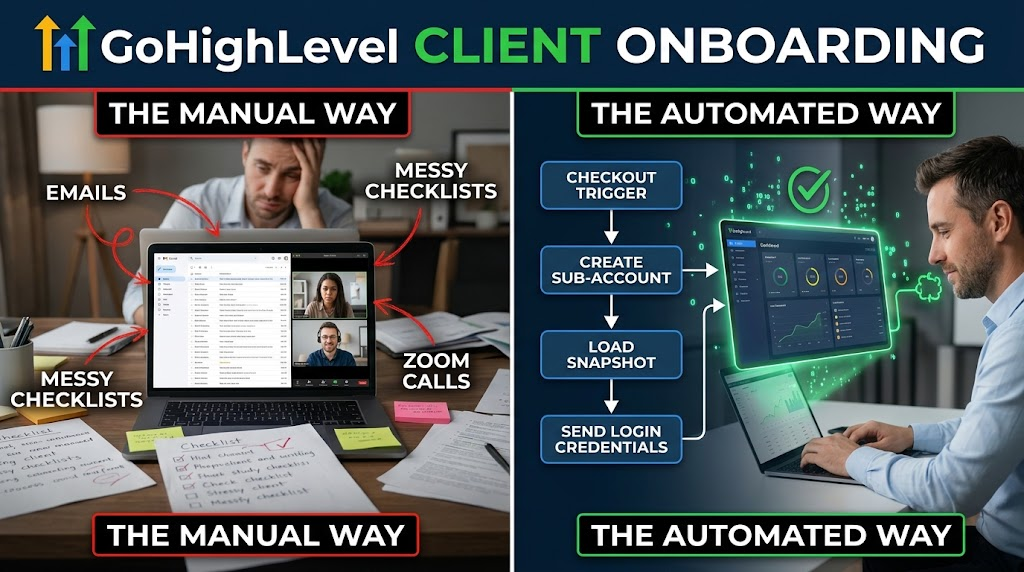
GoHighLevel automated onboarding is the systematic process of using trigger-based workflows and pre-built Snapshots to instantly provision white-label software sub-accounts. It eliminates manual setup by automatically loading custom pipelines, landing pages, and values the second a client completes their purchase, ensuring immediate software access and seamless user adoption.
If you are still manually setting up accounts for every new software client, you do not own a scalable SaaS company—you own a high-friction service business. Manual onboarding creates massive operational bottlenecks. Waiting 24 to 48 hours for an agency to build a sub-account kills buyer enthusiasm and introduces immediate buyer's remorse. By leveraging GoHighLevel Snapshots and trigger-based workflows, agencies can deliver instant account provisioning, allowing clients to access their new, fully configured system seconds after checkout.
The Anatomy of a Scalable GoHighLevel Snapshot
A Snapshot is the foundational blueprint of your white-label SaaS offer. It pre-loads the exact funnels, email templates, custom values, and pipelines a client needs to achieve their operational goals without starting from scratch.
The most common mistake agencies make is building a "bloated Snapshot." Keep your initial Snapshot incredibly lean. If you load a new sub-account with fifty inactive workflows and complex triggers they do not understand, the client will immediately churn due to dashboard overwhelm. Scale requires absolute simplicity.
Triggering the Automated Onboarding Workflow
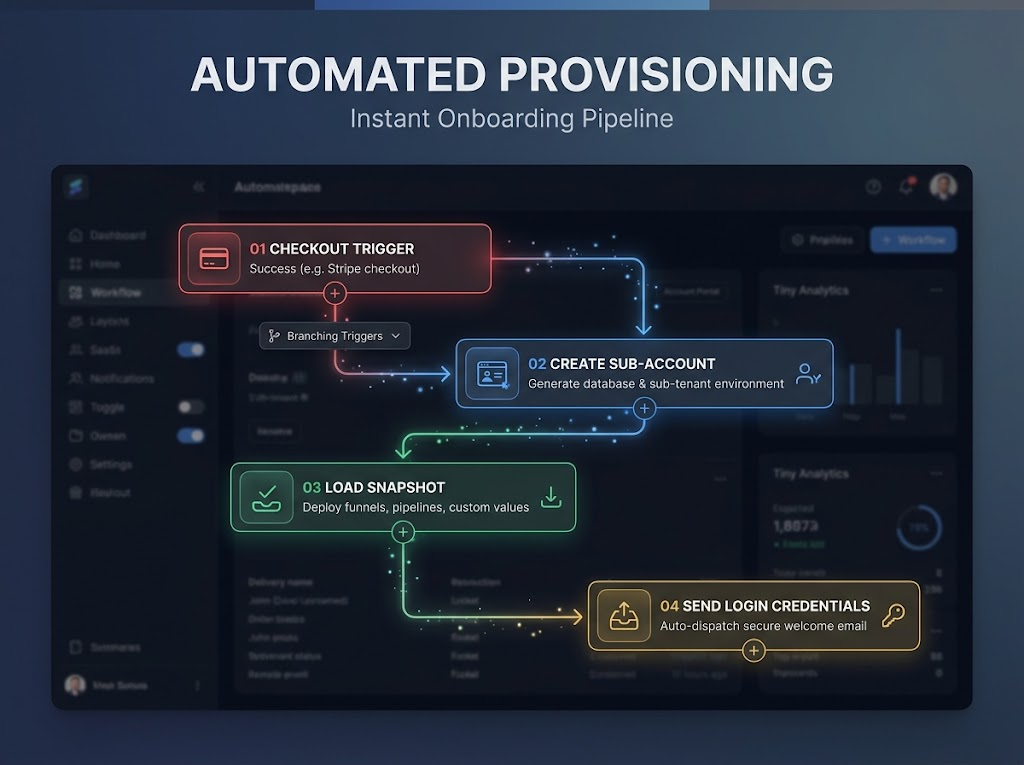
True automation begins at the point of sale. Using the GoHighLevel workflow builder, you can map the exact sequence of events that trigger the moment a purchase is finalized. A successful checkout acts as the trigger to create the sub-account, load your master Snapshot, generate the user profile, and immediately dispatch a welcome email with their unique login credentials.
Furthermore, utilizing Custom Values within your Snapshot is critical for operational scale. Instead of manually typing a client's business name, logo URL, and contact information into every individual funnel page and email template, Custom Values automatically pull this data from the initial signup form and populate it globally across their entire account instantly.
Manual vs. Automated Onboarding Architecture
| Metric | Manual Account Setup | Automated Snapshot Deployment |
|---|---|---|
| Time to Value (TTV) | 24 to 72 hours. | Under 60 seconds. |
| Error Rate | High; prone to human data entry mistakes. | Zero; exact duplication of the master build. |
| Scalability | Capped by your support team's bandwidth. | Infinite; handles 1 or 1,000 signups identically. |
| Client Experience | Frustrating wait times and delayed access. | Instant gratification and immediate login. |
Visualizing the Setup: Why Text Guides Fail
Once the automated system provisions the account, the client still needs to know how to use it. Sending a 30-page PDF manual guarantees failure; busy local business owners will simply ignore it. Top-tier agencies know that acquiring users with scroll-stopping video ads is only step one. You must maintain that premium visual standard post-purchase by deploying high-converting explainer videos directly inside the dashboard.
To achieve zero-touch activation, integrate automated client onboarding sequences directly into the newly deployed Snapshot. This ensures clients receive a timed drip campaign of video tutorials guiding them through critical first steps, such as integrating their Google Calendar or connecting their social profiles.
Seamless automation requires premium visual assets that replace your manual labor. Completely remove yourself from the onboarding process by building a custom SaaS video strategy with our team. Book a free strategy call at GHL Explainer today.
Frequently Asked Questions
Do I need Zapier to automate GoHighLevel onboarding?
No, GoHighLevel’s native workflow builder is robust enough to handle the entire SaaS onboarding process internally. Third-party automation tools like Zapier or Make are generally only necessary if you are triggering the account creation from a checkout software outside of the native GoHighLevel ecosystem.
How do I update a Snapshot for existing clients?
GoHighLevel allows you to push Snapshot updates directly to linked sub-accounts. When you improve a workflow or add a new funnel to your master Snapshot, you can selectively sync those specific elements to all active client accounts without overriding or deleting their existing data.
Can I restrict what a client sees after the Snapshot is loaded?
Absolutely. Using the SaaS Configurator and User Permissions settings, you can toggle off specific dashboard tabs like the website builder, advanced reporting, or complex automation builders. This ensures the client only sees the specific tools relevant to the feature tier they purchased.
Skip the Loom. Talk to us.
Tell us what you're building. We'll tell you exactly which video it needs.
or write to hello@ghlexplainer.com